
Last updated on
Oct 31, 2026
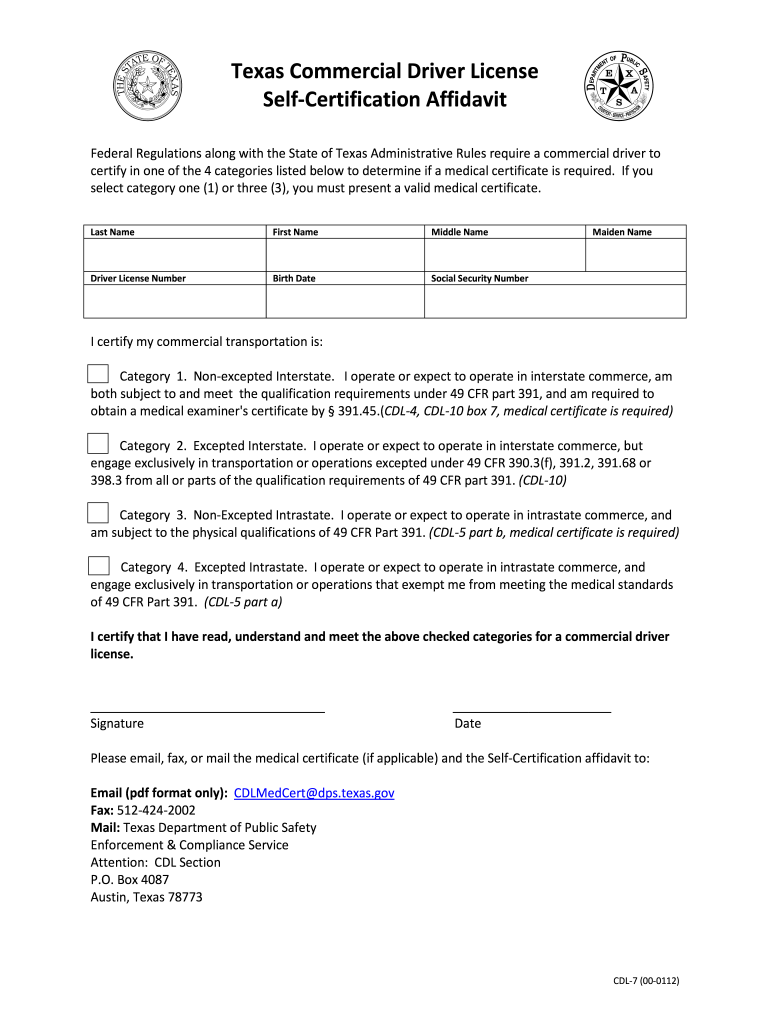
TX DPS CDL-7 2012-2026 free printable template
pdfFiller is not affiliated with any government organization

Fill out
Complete the form online in a simple drag-and-drop editor.

eSign
Add your legally binding signature or send the form for signing.

Share
Share the form via a link, letting anyone fill it out from any device.

Export
Download, print, email, or move the form to your cloud storage.
Why pdfFiller is the best tool for your documents and forms


End-to-end document management
From editing and signing to collaboration and tracking, pdfFiller has everything you need to get your documents done quickly and efficiently.
Accessible from anywhere
pdfFiller is fully cloud-based. This means you can edit, sign, and share documents from anywhere using your computer, smartphone, or tablet.
Secure and compliant
pdfFiller lets you securely manage documents following global laws like ESIGN, CCPA, and GDPR. It's also HIPAA and SOC 2 compliant.
What is TX DPS CDL-7
The Texas Commercial Driver License Self-Certification Affidavit is a government form used by commercial drivers in Texas to certify their type of commercial motor vehicle operation.
pdfFiller scores top ratings on review platforms




the best and simplest way to creates and modify pdf documents.
LOVE PDF FILLER...SO GLAD I FOUND IT..LOVE BEING ABLE TO TYPE ALL THE INFO AND PRINT IT OUT IMMEDIATELY!!
THANK YOU!
Who needs TX DPS CDL-7?
Explore how professionals across industries use pdfFiller.

TX DPS CDL-7 is needed by:
-
Commercial drivers applying for a Texas CDL
-
Applicants needing to certify medical requirements for commercial driving
-
Individuals updating their commercial driver license information
-
Those submitting documentation to the Texas Department of Public Safety
-
Drivers transitioning to a new commercial vehicle category
Comprehensive Guide to TX DPS CDL-7
What is the Texas Commercial Driver License Self-Certification Affidavit (CDL-7)?
The Texas Commercial Driver License Self-Certification Affidavit, also known as the CDL-7 form, is essential for commercial drivers in Texas. This form certifies the type of commercial vehicle operation a driver may engage in. When filling out the CDL-7, it is crucial to understand that a medical certificate must also be submitted if applicable. Additionally, note that the reference date of January 30, 2014, has implications on the current validity of the form.
Compliance with this affidavit ensures that drivers adhere to state regulations, providing necessary documentation for the Texas Department of Public Safety (DPS). As such, the CDL-7 form is integral to maintaining legal driving status for commercial drivers operating in Texas.
Purpose and Benefits of the Texas CDL-7
The Texas CDL-7 form serves as a compliance tool for commercial drivers, ensuring they meet state regulations for operating commercial vehicles. By accurately submitting this form, drivers can avoid potential fines arising from improper vehicle operation.
This self-certification form also facilitates communication with the Texas DPS, thus helping in the maintenance of valid driving privileges and enhancing operational efficiency. Ultimately, it supports drivers in upholding professional standards required in the transportation industry.
Who Needs the Texas CDL-7?
Various categories of commercial drivers are required to fill out the Texas CDL-7 form. This includes those operating specific vehicle types, such as buses or hazardous materials vehicles, and those with certain medical conditions that necessitate additional documentation.
It is essential for drivers to recognize that not everyone is obligated to submit this form. The CDL-7 is particularly relevant for commercial drivers with specific licensing and operational requirements.
How to Fill Out the Texas CDL-7 (Step-by-Step)
Filling out the Texas CDL-7 requires attention to detail. Follow these steps to complete the form correctly:
-
Begin with your Last Name and First Name.
-
Enter your Driver License Number accurately.
-
Provide your Date of Birth and Social Security Number.
-
Select the type of commercial operation you qualify for.
-
Complete the signature line, including the date.
Make sure to double-check all fields for correctness to prevent delays in processing your affidavit.
Common Errors and How to Avoid Them
Applicants often encounter several pitfalls when filling out the CDL-7 form. Common mistakes include leaving fields incomplete, failing to sign, or making errors in personal information.
To avoid these issues, implement the following strategies:
-
Thoroughly review all entries for accuracy before submission.
-
Ensure every required field is completed, including names, numbers, and dates.
Paying close attention to detail is vital to prevent rejections and subsequent delays.
Where and How to Submit the Texas CDL-7
Submission of the Texas CDL-7 form can be done through several methods:
-
In-person at a Texas Department of Public Safety office.
-
By mail, ensuring the correct address is used.
-
Online, if available as an option.
When submitting, be aware of any state-specific nuances regarding processing times and potential fees. Different submission methods may incur various fees, so it's essential to confirm payment methods accepted during submission.
Consequences of Not Filing the Texas CDL-7 on Time
Failing to file the Texas CDL-7 form by the required deadline can lead to significant consequences. Drivers may face fines or penalties, impacting their ability to operate commercially.
A delay or failure to submit can adversely affect driving privileges and overall professional license status. Maintaining compliance with submission deadlines is crucial for uninterrupted operations within the commercial driving sector.
Security and Compliance Related to the Texas CDL-7
Handling personal data in the CDL-7 form comes with the responsibility of ensuring security. Measures are taken to protect sensitive information throughout the completion and submission process.
Utilizing platforms that comply with regulations such as HIPAA and GDPR enhances security and compliance. Opting for secure cloud services for document submission and storage offers additional benefits, ensuring that data is safeguarded effectively.
Effortless Form Completion with pdfFiller
pdfFiller simplifies the process of completing the Texas CDL-7 form. This platform allows users to fill, eSign, and manage the CDL-7 form securely from any internet-enabled device.
Users can access templates designed for the Texas CDL-7, streamlining the process of both filling out and submitting the application. Leverage the advantages of pdfFiller for effective document management and submission.
Sample of a Completed Texas CDL-7
A visual example of a filled Texas CDL-7 form can serve as a valuable guide for applicants. This sample highlights the completed sections, assisting users in understanding what information is required.
It is essential to note that the specific details on the form may vary based on individual situations, so use the sample as a starting point for accuracy in your submission.
How to fill out the TX DPS CDL-7
-
1.Access pdfFiller and type 'Texas Commercial Driver License Self-Certification Affidavit' into the search bar to locate the form.
-
2.Open the form to view its contents in pdfFiller's editor. Familiarize yourself with all the fillable fields.
-
3.Before you start filling out the form, gather necessary personal information such as your last name, first name, driver license number, birth date, social security number, and any required medical documents.
-
4.Navigate to each fillable field in the form by clicking on it. Enter the corresponding information clearly and accurately.
-
5.After you fill in all relevant sections, review the completed form carefully to ensure all information is correct and complete.
-
6.Check for any omitted fields or discrepancies, and make any necessary edits in pdfFiller.
-
7.Once you are satisfied with the filled form, choose 'Save' to store it, or 'Download' it as a PDF file for submission.
-
8.For submission through pdfFiller, use the built-in features to send the form directly to the Texas Department of Public Safety or print it to mail.

Who is eligible to complete the Texas CDL Self-Certification Affidavit?
Commercial drivers who hold a Texas CDL or are applying for one must complete the Texas Commercial Driver License Self-Certification Affidavit to certify their operation of commercial motor vehicles.
What is the deadline for submitting this form?
The form is outdated and references a previous deadline of January 30, 2014. It is advisable to check with the Texas Department of Public Safety for current submission guidelines and deadlines.
How do I submit the Texas CDL Self-Certification Affidavit?
This affidavit must be submitted to the Texas Department of Public Safety, either by mailing a printed version or submitting through their online systems, if available.
What supporting documents are required with this form?
If a medical certificate is required, drivers must include it when submitting the affidavit. It's important to check the specific requirements based on your driving category.
What common mistakes should I avoid when filling out the form?
Ensure that all personal information is accurate, fields are not left blank, and any required signatures are provided. Double-check for errors before submission.
How long does it take to process this form?
Processing times can vary depending on the Texas Department of Public Safety's current workload. It is generally a good idea to allow several weeks for processing after submission.
Are there fees associated with this form?
While the form itself does not carry a fee, applicable fees to obtain or renew your commercial driver license may apply. Check with the Texas DPS for detailed fee structures.
Related Content
Related Forms



Related Catalogs
Get the latest insights from our blog


If you believe that this page should be taken down, please follow our DMCA take down process
here
.
This form may include fields for payment information. Data entered in these fields is not covered by PCI DSS compliance.